
DAST Scan
DevSecOps represents the cultural and technical evolution of the Software Development Lifecycle (SDLC), embedding security into every phase of development. Instead of treating security as a final bottleneck, we treat Security as Code.
Comprehensive Guide to DAST in DevSecOps Pipelines
This guide explores Dynamic Application Security Testing (DAST) and demonstrates how to embed it after SAST tests and I’m gonna discussing corner cases in this wide test.
For this tutorial, we’ll use a deliberately vulnerable Express.js app as our test case. You can find the complete code in the repository: View demo code in the Repo
Let’s dive..
What is DAST?
Dynamic Application Security Testing (DAST) is a black-box security testing methodology that analyzes applications from the outside-in while they are running. Unlike Static Application Security Testing (SAST), which examines source code, DAST tools interact with the application as an attacker would—sending requests, analyzing responses, and identifying vulnerabilities through actual runtime behavior.
Key Characteristics of DAST
- Runtime Analysis: Tests the application in its running state, typically in QA or staging environments
- Black-box Testing: No access to source code required—tests the application as an external user would
- Real-world Simulation: Identifies vulnerabilities that only appear when the application is deployed and operational
- Technology Agnostic: Works with any web application regardless of the programming language or framework
How DAST Works
DAST tools operate through a systematic process:
- Discovery/Crawling: The scanner explores the application by following links, forms, and API endpoints to map the attack surface
- Attack Simulation: It sends malicious payloads designed to exploit common vulnerabilities (SQL injection, XSS, etc.)
- Response Analysis: The tool analyzes HTTP responses, error messages, and behavior to identify security weaknesses
- Reporting: Findings are categorized by severity with evidence and remediation recommendations
Embedding DAST Tools into the Pipeline
Integrating DAST into your CI/CD pipeline transforms security from a gate-keeping activity into a continuous validation process. Here’s how to embed DAST effectively:
Pipeline Integration Strategy
Stage Placement: DAST should run after deployment to a test environment where the application is fully functional. A typical pipeline flow:
Build → SAST → Unit Tests → Deploy to QA → DAST → Integration Tests → Deploy to Staging
For effective DAST, the application must be accessible. In professional CI/CD workflows, this often requires network accessibility between the runner and the target.
- Deployment Architecture: For this demonstration, the application was deployed to a publicly accessible AWS EC2 instance. This enables automated security scanning through GitHub Actions.
- Local Testing: In a local lab environment, you can run the app and point a tool like OWASP ZAP to
localhost.
I deployed it on aws linux instance with accepting all Inbound/Outbound traffic with apache web-app and public ip -in our case- is 18.234.200.202
Finally, configured apache server to accept http requests on our app (skip this step cuz it out of report scope)
Visualizing the Process
Once the scanner begins, it maps the URI structure and processes the attack surface:
- Discovery: ZAP crawls known URIs.
- Active Scan: Malicious payloads are sent to identified inputs.
- Reporting: Results are generated in HTML/JSON formats.
But in the lab i can test it locally, run app normally then check it with zap:

Then
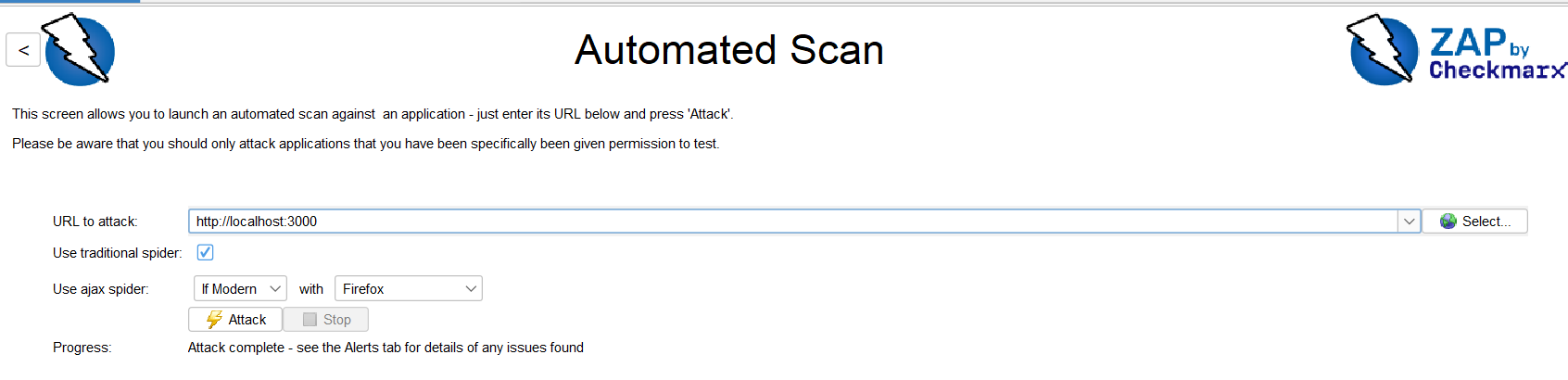
Results will appear after check all possible uris that zap knows
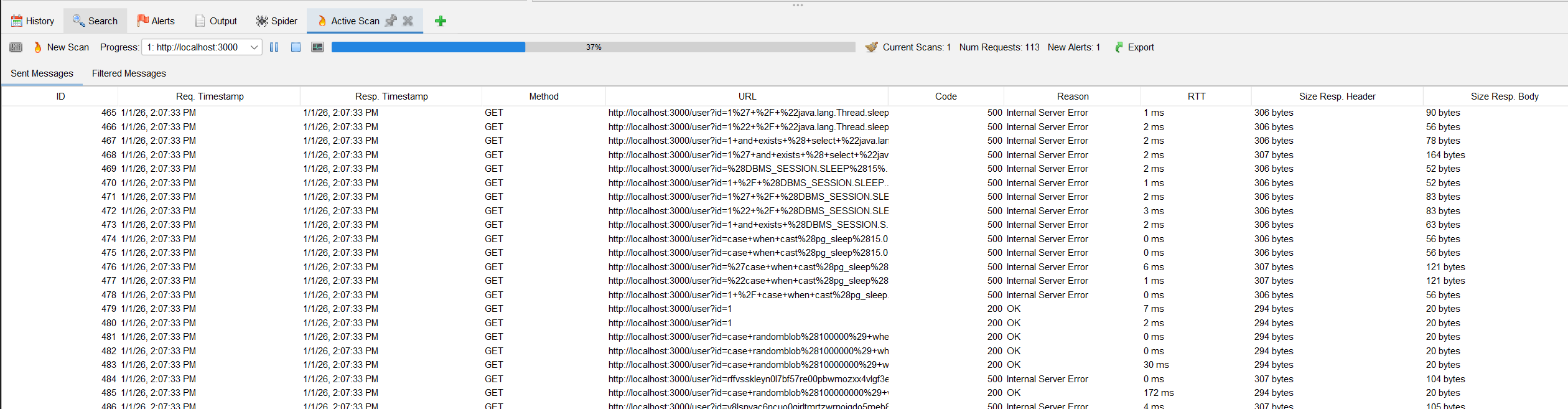
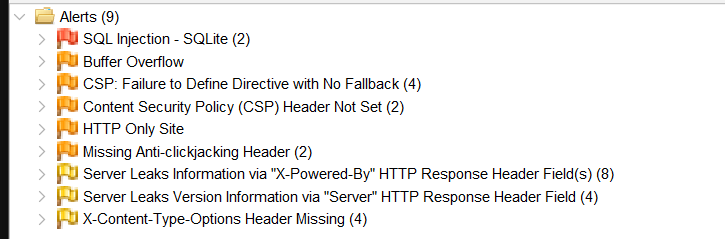
Finally you can open the result and read the details
Report will be generated in html and this is the thing you can configure in the workflow with any format you want, like that:
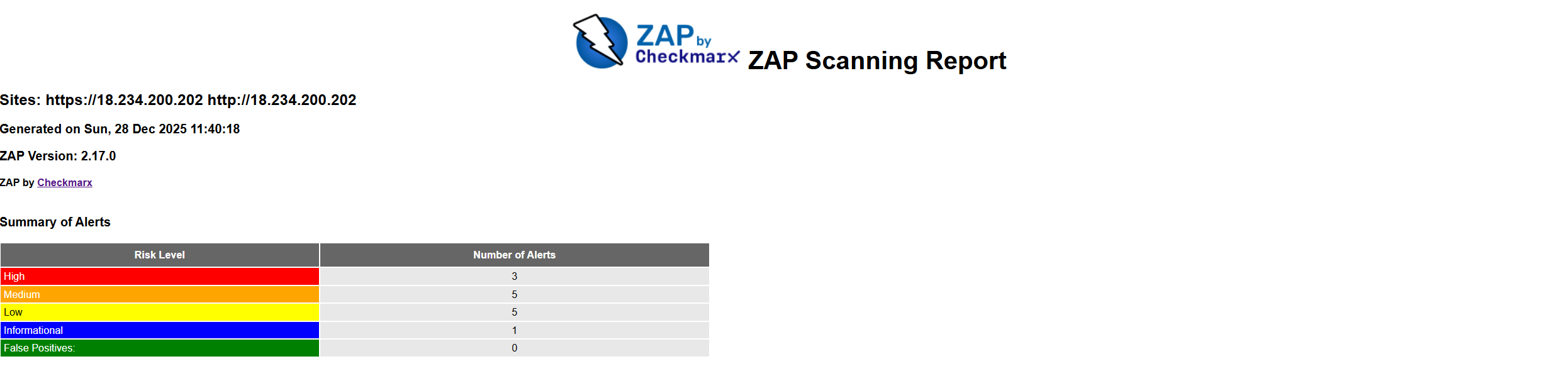
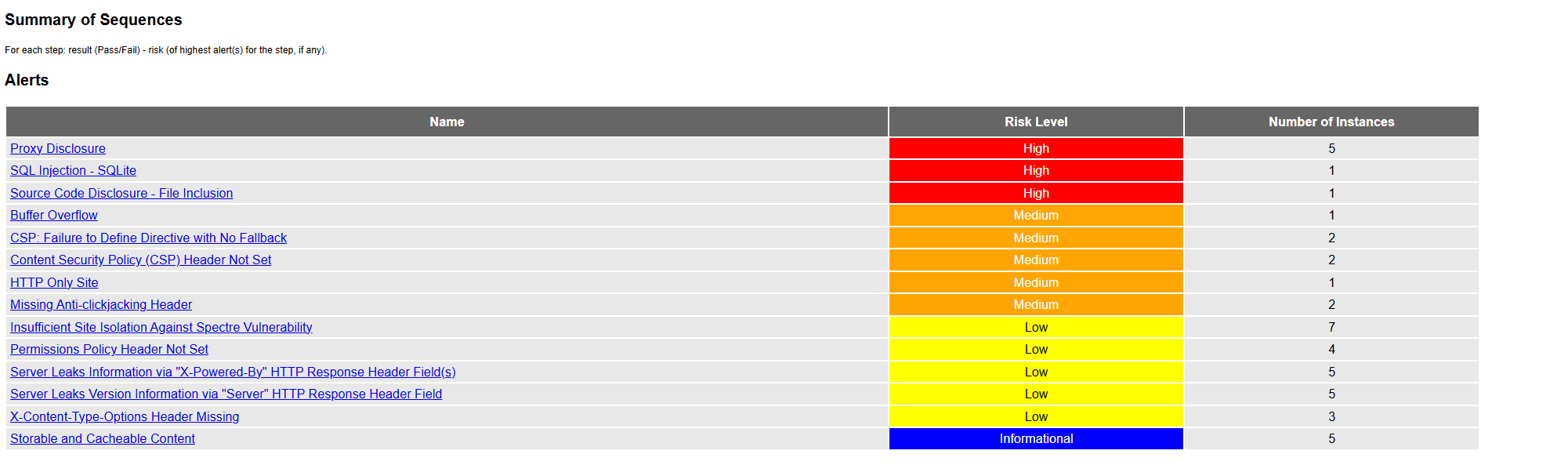
I decided the scope of work is all application and basicly this is how it works.
Navigating DAST Corner Cases
While DAST provides critical visibility, traditional automated scans often encounter “blind spots.” To achieve comprehensive coverage, we must address these specific corner cases.
1. The Authentication Barrier
The most common bottleneck for DAST is Authenticated Functionality. Traditional crawlers often get stuck at login screens or fail when a session token expires.
- The Risk: If the scanner cannot bypass the login, it only tests the “public” surface (Login/Signup), leaving the core business logic (User Profiles, Admin Panels) untouched.
- The Solution: Implement Form-Based or Scripted Authentication. Most modern tools allow you to provide an
Authorizationheader or a session cookie that the scanner uses to maintain an active session.
Practical Implementation Example: In our Express.js demo, we can inject a JWT into the ZAP scanner’s header via the CLI: (out of scope but for explanation)
docker run -t ghcr.io/zaproxy/zaproxy:stable zap-full-scan.py \
  -t http://18.234.200.202 \
  -z "-config replacer.full_list(0).description=auth \
      -config replacer.full_list(0).enabled=true \
      -config replacer.full_list(0).matchtype=REQ_HEADER \
      -config replacer.full_list(0).matchstr=Authorization \
      -config replacer.full_list(0).replacement='Bearer $'"
2. Shifting from Web to API Security
Modern applications rely on REST or GraphQL APIs. Standard crawlers designed to follow HTML links (<a> tags) will fail to discover hidden API endpoints.
- The Challenge: APIs don’t have “links” to follow. Without a map, the tool is essentially guessing endpoint names.
- The Solution (OpenAPI/Swagger): By providing the DAST tool with an OpenAPI Specification (OAS) file, you provide a structured roadmap.
| Feature | Traditional Crawl | OpenAPI-Based Scan |
|---|---|---|
| Discovery | Only finds visible HTML links. | Finds all documented endpoints (Hidden APIs). |
| Methods | Misses POST/PUT/DELETE methods. | Tests all HTTP methods defined in the spec. |
| Data Depth | Struggles with JSON payloads. | Understands expected JSON structure and types. |
Using Zest Language for Enhanced Coverage
One of the most efficient ways to obtain comprehensive Zest scripts is through collaboration with your QA team. QA testers already create detailed test cases that cover various user workflows, edge cases, and business logic scenarios. These same test cases can be transformed into security test scripts.
QA engineers typically use Zest scripts in tools like OWASP ZAP
- Automate Regression Testing: Test critical workflows after each deployment
- Validate User Journeys: Ensure multi-step processes work correctly (e.g., checkout flows)
- Test Authentication Flows: Verify login/logout and session management
- Handle Complex Scenarios: Test conditional logic, error handling, and state transitions
- Data-Driven Testing: Run the same workflow with multiple input datasets
Final Thoughts:
By the end of this comprehensive guide, you now possess a robust understanding of Dynamic Application Security Testing (DAST) and the strategic implementation of ZAP within modern DevSecOps pipelines.